
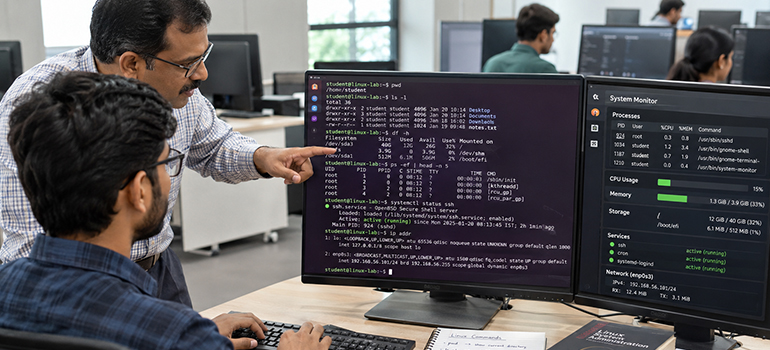
Linux Administration Training Ahmedabad helps learners understand essential commands for managing files, checking services, investigating problems, and controlling access. Furthermore, administrators need to understand command results rather than memorise instructions without context. The right command can reveal useful information about a slow or unavailable system. Regular practice helps learners connect these findings with clear troubleshooting decisions. Discuss practical learning opportunities with HighSky IT Solutions when reviewing your training options.
Which Linux Commands Should Administrators Learn First?
Start with commands covering navigation, files, permissions, processes, storage, networking, and service management. Additionally, learn how to read command documentation before trying unfamiliar options. Administrators rarely solve problems through one command because different checks reveal different details. For example, an unavailable application might involve storage, network access, or service failures. Understanding these connections helps you choose useful checks and interpret their results.
How Do pwd, ls, and cd Help With Navigation?
The pwd command shows the path of your current working directory. Meanwhile, ls lists directory contents, while the shell command cd changes your working directory. For example, cd /var/log moves your session into the specified logging directory. Check your location before running commands that depend on relative file paths. These basic habits help you work accurately when managing several directories and configuration files.
Why Should You Understand Absolute and Relative Paths?
An absolute path identifies a location starting from the root directory. In comparison, a relative path depends on your current working directory. This difference matters when commands read, copy, move, or modify particular files. Practise both path types when comparing exercises within Linux Training Ahmedabad programmes. Clear path knowledge helps you understand where commands operate before making changes.
Which Commands Help You Create, Copy, and Move Files?
Use mkdir to create directories and cp to copy files into another location. Additionally, mv moves files or renames them, depending on the supplied paths. For example, cp notes.txt notes-backup.txt creates a separate copy of the original file. Check destination names carefully because existing files may otherwise receive replacement content. Practise these operations with sample files before handling important configuration or business information.
How Can You Read Files and Find Relevant Information?
Commands such as cat, less, head, and tail help you inspect file content. Furthermore, grep searches text for matching patterns, while find locates matching filesystem entries. For example, tail -n 20 application.log displays the file’s final twenty lines. Use these tools together when investigating configuration details or reviewing application messages. Choose the command that reveals relevant information without overwhelming your terminal with unnecessary output.
Why Do Administrators Need chmod, chown, and id?
The chmod command changes file permissions, while chown changes ownership information. Additionally, id displays user and group identifiers that help you investigate access questions. For example, chmod u+x script.sh adds execute permission for the file’s owner. Review existing permissions before making changes, and grant access according to actual requirements. Avoid treating broad permissions as a routine solution for every access problem.
How Should You Approach Commands That Require Extra Privileges?
Some administration tasks require privileges that your normal user account does not provide. However, extra privileges also increase the impact of mistakes in commands or paths. Understand the intended change before using sudo under your organisation’s access rules. Ask HighSky IT Solutions how proposed exercises explain permissions and privileged operations. Effective Linux Administration Training Ahmedabad should encourage clear reasoning before learners modify protected resources.
How Do ps and top Support Process Troubleshooting?
The ps command displays information about processes running on the system. Meanwhile, top provides an updating view that helps you observe resource activity. For example, ps -ef lists processes using a detailed format available on common Linux systems. Review process identity and purpose before deciding whether any intervention makes sense. High resource usage provides a troubleshooting clue, but it does not automatically identify the underlying cause.
What Is the Difference Between df and du?
Use df -h to check filesystem space through sizes that humans can read easily. By comparison, du -sh directory summarises disk usage for the specified directory. These commands answer related questions, but they measure storage from different perspectives. Administrators can use both when investigating reports about limited available disk space. Review findings carefully before removing anything, because applications may depend on unfamiliar files.
How Do systemctl and journalctl Help Manage Services?
On systems using systemd, systemctl helps you inspect and manage service units. Additionally, journalctl lets you read messages from the systemd journal during investigations. For example, systemctl status nginx checks a service named nginx when that unit exists. Use journalctl -u nginx to inspect journal entries associated with that unit. Service names vary, so confirm the correct name before applying either example.
Which Commands Help You Investigate Network Problems?
Use ip addr to inspect interface addresses and ip route to examine routing information. Furthermore, ss -lnt displays listening TCP sockets without requesting hostname or service-name resolution. These checks help you investigate addresses, routes, and whether applications listen for connections. However, a listening socket alone does not prove that remote users can connect. Administrators should combine findings with relevant firewall, application, and network checks.
Why Should Administrators Learn to Use man?
The man command opens available manual pages explaining command behaviour and supported options. Moreover, reading documentation helps you distinguish similar flags that produce different results. For example, man chmod explains permission changes more thoroughly than a short command list. When considering Linux Administration Online Training in Ahmedabad, ask how instructors teach documentation skills. This habit helps learners investigate unfamiliar commands and adapt examples to their own environments.
How Can You Practise Linux Commands Effectively?
A Practical Command Learning Checklist
Build your practice around small administration tasks instead of memorising isolated command names. Furthermore, record what you expected, what happened, and how you checked the result. A practice environment gives you room to investigate mistakes without affecting operational systems. When comparing Linux Training Ahmedabad options, request exercises involving explanations and troubleshooting. Discuss these learning priorities with HighSky IT Solutions before choosing a suitable course.
- Confirm your working directory before running commands that use relative paths.
- Practise copying and moving sample files while checking every destination carefully.
- Inspect permissions and ownership before deciding whether access changes are necessary.
- Compare process activity, storage usage, service status, and relevant log messages.
- Read manual pages before using unfamiliar options or changing protected resources.
- Explain each command’s purpose and verify its result after every exercise.
Build Administration Confidence Through Clear Command Knowledge
Linux administration requires accurate observation, thoughtful decisions, and an understanding of command behaviour. Therefore, learn essential commands through practical tasks that connect several troubleshooting steps. Compare Linux Administration Online Training in Ahmedabad options through assignments, trainer feedback, and documentation practice. Ask HighSky IT Solutions how its proposed learning approach matches your existing knowledge. Consistent practice can help you investigate problems and explain your decisions more confidently.
FAQs
Start with navigation, files, permissions, processes, and storage commands; discuss suitable practical exercises with HighSky IT Solutions.
They show your location, list contents, and change directories; ask HighSky IT Solutions about guided navigation exercises.
Use cp for copying and mv for moving or renaming; discuss sample-file practice with HighSky IT Solutions.
It finds text matching a pattern; ask HighSky IT Solutions about exercises involving configuration files and application messages.
Permissions control access to files and directories; ask HighSky IT Solutions how assignments explain ownership and appropriate permission changes.
df reports filesystem space, while du estimates file usage; discuss practical storage investigations with HighSky IT Solutions.
Use systemctl for service inspection and journalctl for journal messages; ask HighSky IT Solutions about relevant troubleshooting exercises.
ip inspects addresses and routes, while ss examines sockets; discuss network troubleshooting practice with HighSky IT Solutions.
Compare command practice, troubleshooting tasks, documentation skills, and trainer feedback when discussing course arrangements with HighSky IT Solutions.
Manual pages explain behaviour and options; ask HighSky IT Solutions how its proposed exercises develop independent documentation skills.